
Everything HandsFreeOS does.
Six or seven apps’ worth, in one system that already knows who the customer is. Here is the whole of it, in plain English.
Calls and texts
One number, and one inbox for everything said to your business
Texts, calls, voicemail, email and website chat land in the same place, in one thread per customer, and the whole team can see it.
- Your own local or toll-free business number — or keep the number people already have for you.
- Calls ring the cell phones you nominate. Calling a customer back from the app shows your business number, not your personal one.
- A missed call turns into a text back within a minute, if you want one.
- Voicemail arrives typed out, so you can read it between jobs instead of listening to it.
- Email in the same thread as the texts, from a connected Gmail or Outlook mailbox.
- Website chat on your own site, answered in the same inbox.
- Registration with the carriers, which US business texting requires, is part of setting you up.
- Anyone on the team can pick up a conversation, and you can see who is on it.
Customers
Every customer on one page, with everything that ever happened
Not a contact list. Every text, call, email, appointment, quote, invoice, photo and note about a person, in the order it happened.
- Leads move through a pipeline whose stages you decide, dragged from one to the next.
- Tasks with due dates, assigned to whoever is doing them.
- Notes, tags and the details that matter for your trade.
- Photos and files attached to the customer, not lost in a camera roll.
- Import from a spreadsheet in a few minutes.
- Everything updates live — what one person changes, everyone else sees without refreshing.
Calendar
A calendar customers book themselves into, without double-booking anyone
One calendar that becomes what your business needs through its settings, rather than five different products.
- Book a named person, round robin across the crew, weighted so the new guy gets fewer, first available, or everyone together on the big job.
- Let the customer choose who comes, or run a calendar with no staff at all, where the room, the bay or the machine is what gets booked.
- Services with their own length, price, travel buffer and questions to ask at booking.
- A public booking page per service, on your own web address, that works on a phone.
- Google and Outlook busy times respected both ways, so a dentist appointment blocks a job.
- Reminders by text and email before the visit, and a notice when someone is on the way.
- Deposits taken at the moment of booking, with the time held while they pay.
Getting paid
Quotes they approve with their name, invoices that chase themselves
Priced from a catalogue you keep, sent from your phone, paid on the customer’s own screen — into your account, not ours.
- A catalogue of services and parts with your prices, so a quote is a few taps.
- Estimates the customer approves by typing their name, which is recorded with the time and the version they saw.
- Invoices with a payment link, paid by card through your own Stripe or Square account.
- Deposits at booking, and maintenance plans that bill themselves every month.
- Unpaid invoices are chased on a schedule you set, without anybody remembering to.
- Receipts go out on their own; refunds are two clicks from the same screen.
- HandsFreeOS never holds your money and takes no cut of it.
AI teammate
An AI teammate that answers your customers — once it has earned it
One teammate per business, with a name you pick and wording you approve. It starts by drafting and waiting for you, and only sends on its own once a kind of reply has earned enough of your approvals.
- Answers new leads by text, email and website chat, usually in seconds.
- Asks the questions that qualify a job, then books it straight into the calendar.
- Hands the conversation to a person the moment someone asks for one, sounds unhappy, or it is not sure.
- Prices stay locked until you turn them on. After that it can only quote a number exactly as you wrote it.
- It writes from a knowledge base you can read and edit: your services, your hours, your FAQs, and what a scan of your website found.
- Everything it sends sits in the thread with the reason it sent it, so you can see how it is doing.
- Put it back to asking first at any time, for everything or just for prices.
The Assistant
Ask for something in plain English, and watch it happen
A panel on every screen. It answers questions about your business from your real data, and it does the work too — always showing you exactly what it is about to change before it changes it.
- “Who hasn’t paid me?” “Book Dale for Thursday morning.” “Text everyone whose service is due.”
- Anything it is about to do arrives as a card: this is what I will send, to whom, and when. You say yes.
- It sets the business up by asking you questions, instead of you hunting through settings pages.
- It writes estimates, fills in customers, moves appointments and drafts replies for you to send.
- It knows what you are looking at, so “move this to Friday” means this one.
Follow-ups
The follow-ups you keep meaning to do, done without you
Something happens — a lead comes in, a call is missed, a job finishes, an invoice goes late — and the follow-up runs itself.
- Ready-made ones to start from: speed to lead, missed-call text back, appointment follow-up and review, estimate follow-up, no-show rebook.
- Three ways to edit the same workflow: a list of steps, a canvas you draw, or a sentence you type and it builds.
- Steps can text, email, wait, create a task, or hand the whole thing to your AI teammate.
- AI steps read the reply and take the right branch — emergency, wants to book, has a question, something else.
- Any step can stop and ask a person to approve before it goes out.
- A review request that goes to a happy customer, and quietly does not go to an unhappy one.
What needs you
One ranked list instead of a dashboard of graphs
Home is not a wall of charts. It is what needs a person today, in order, with the money affected at the top.
- The hot lead waiting eleven minutes, the quote about to go stale, the invoice ten days late.
- The safe ones — confirmations, gentle nudges — HandsFreeOS just handles, and tells you it did.
- Anything else: “Let HandsFreeOS handle” it, or do it yourself from the same card.
- Switch between what needs you and what needs anyone on the team.
- A morning email with what happened overnight and what is waiting, and an email straight away for the urgent ones.
On the phone
The whole thing in the pocket of the person doing the work
An app for iPhone and Android where everything can be read and changed with no signal at all, and catches up when the bars come back.
More about the phone app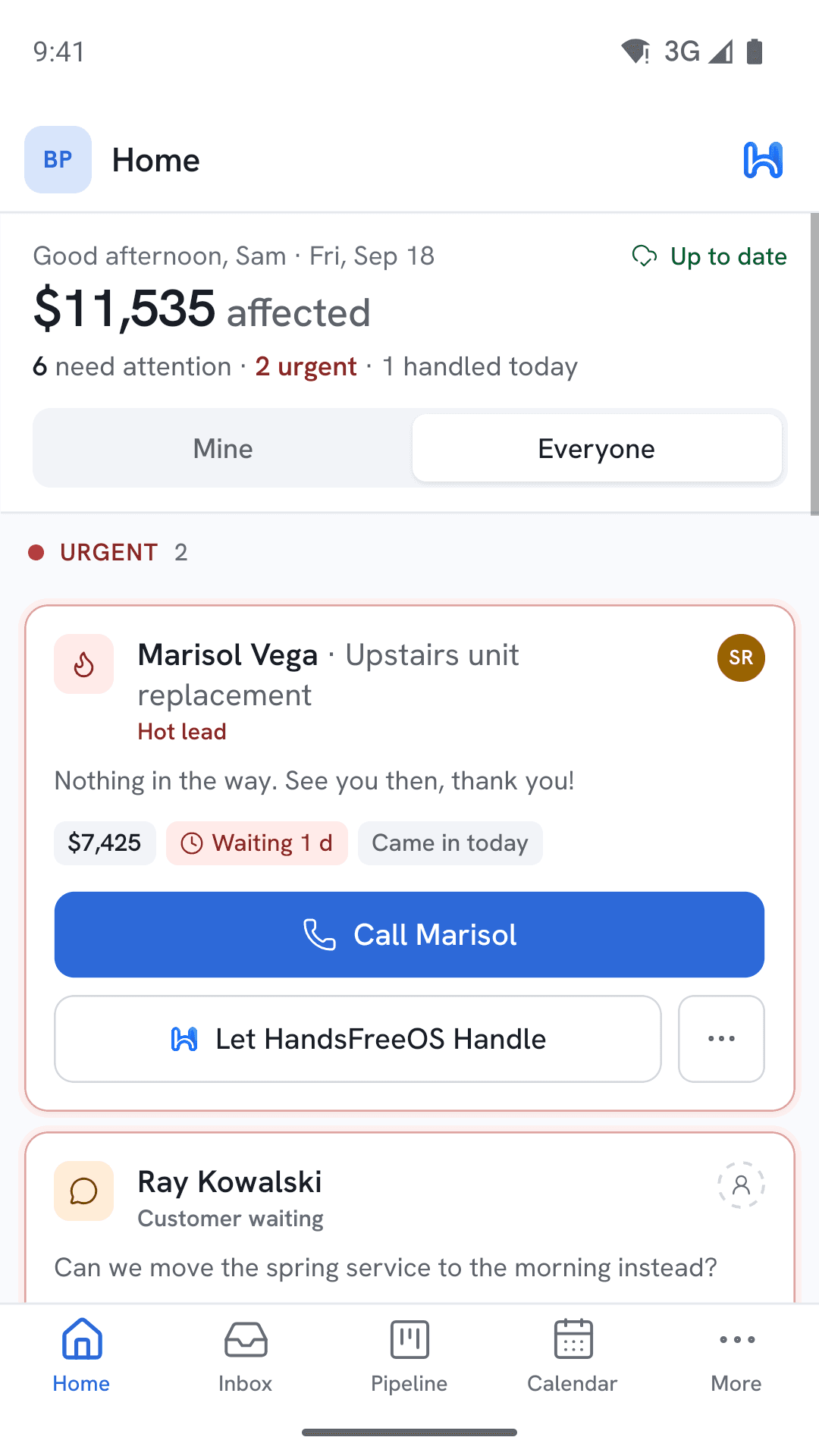
- Look up a customer, write a note, take photos, move a job or start an invoice in a basement.
- A text written with no signal sends itself within half an hour, or asks “still send?” if it has been longer.
- Notifications you can act on without opening the app.
- Face ID to unlock, and a code by email if you would rather not have a password.
Moving in
Your customers and your history come with you
Moving off the system you use today is the part people dread, so it is built to be careful and reversible.
- It counts everything before it moves anything, and tells you how sure it is of each count.
- The same customer arriving from two places is joined without ever guessing on a name.
- Old conversations and appointments keep the dates they really happened on.
- It can be taken back without touching anything you have changed since.
- Proven on GoHighLevel first, with more systems following — tell us what you are on and we will tell you where it stands.
Underneath all of it.
The parts nobody puts on a website, which matter the first time something goes wrong.
Three roles, and nothing fuzzy
Owner, Admin and Member. A Member does the work and cannot invite people or change your settings. It is enforced in the database itself, not just hidden in the screens.
Every change is recorded
Who did what, when, and what it changed — including everything the AI did. Nothing happens in this system that cannot be traced back.
Your data stays yours
Export your customers, conversations, appointments and money records whenever you want. Leaving is a thing you can actually do.
One business cannot see another
If you run several locations, each one’s data is separated where it is stored, not just in the app. The same is true of every other business on HandsFreeOS.
All of that is on one plan.
Growth is every feature on this page, for one business — nothing is held back for a bigger plan. Starter is the smaller version for a one-person shop, and Pro is for running more than one business.